Hi there,
I bought a BFLY-PGE-31S4M/C-C 1/1.8" Blackfly® PoE GigE Monochrome Camera https://www.edmundoptics.com/p/bfly-pge ... mera/3875/, but I'm having trouble connecting the camera to the Spectrum Analyzer software even though it connects to Spinnaker IDK. I was going through the manual to resolve it, but I can't figure out why the camera is still not detected.
Best,
Bowen
Camera Not Detected

Re: Camera Not Detected
Hi,
Can you double check the followings ?
Can you double check the followings ?
- is the spinview software closed when you try to connect to the camera using SpectrumAnalyzer?
- is the ip address of the camera in the valid range ?
-
BowenZheng
- Posts: 33
- Joined: Wed Jan 31, 2024 11:38 pm
Re: Camera Not Detected
Hi Luc,
How do I determine if the IP address of the camera is in the valid range? I can identify the IP address, but could you clarify what the valid range is supposed to be?
Thank you,
Bowen
How do I determine if the IP address of the camera is in the valid range? I can identify the IP address, but could you clarify what the valid range is supposed to be?
Thank you,
Bowen
Re: Camera Not Detected
Can you open spinview and take a screenshot of the camera list ? without doing anything else
-
BowenZheng
- Posts: 33
- Joined: Wed Jan 31, 2024 11:38 pm
Re: Camera Not Detected
Hi Luc,
Sorry for the late reply, but the OpenRaman software is now successfully running when I close the spinnaker software. However, when I go back to try to use the spinnaker software, it's saying that another application is running it. Is there a way to bypass this and use both applications simultaneously?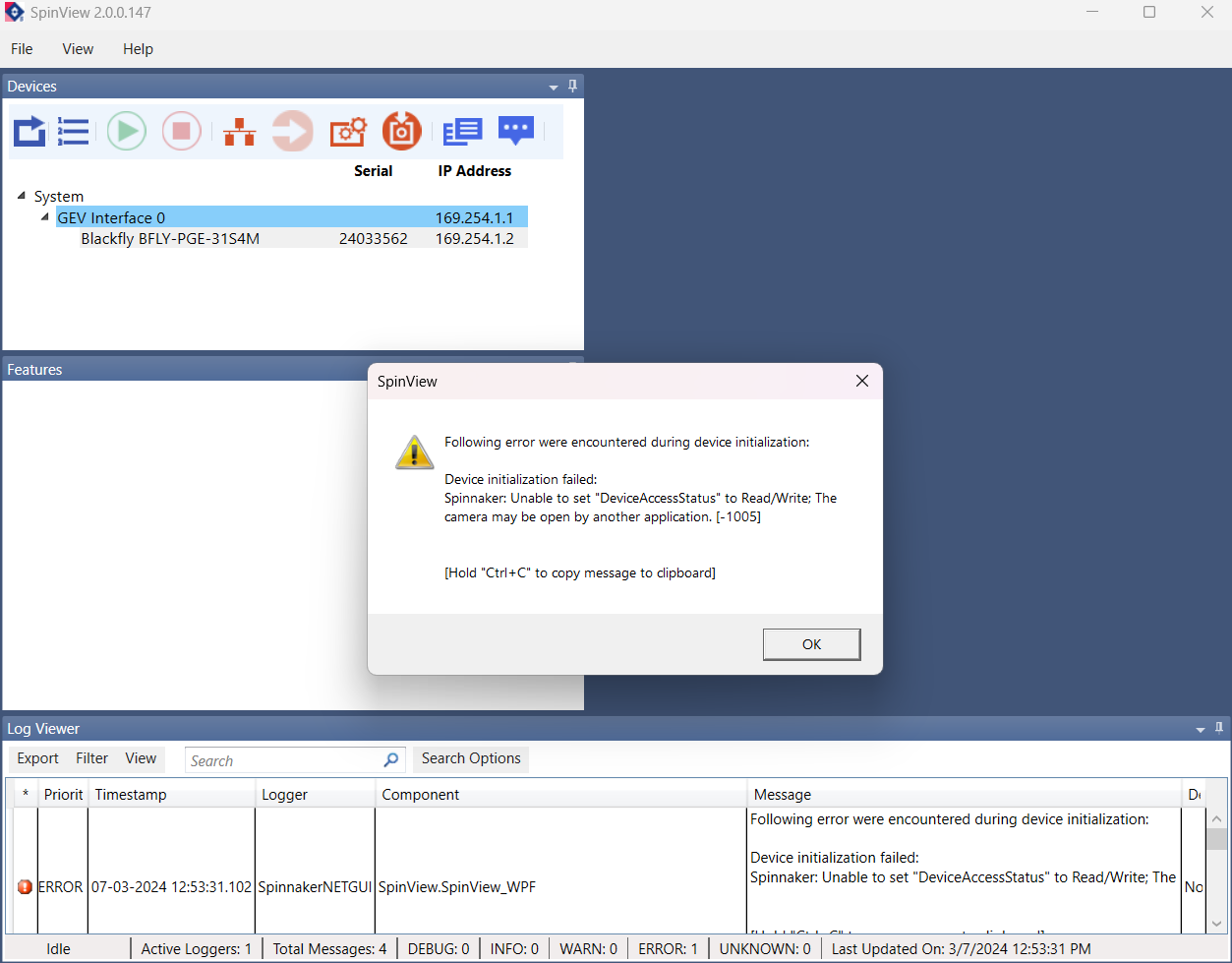 .
.
Thank you,
Bowen
Sorry for the late reply, but the OpenRaman software is now successfully running when I close the spinnaker software. However, when I go back to try to use the spinnaker software, it's saying that another application is running it. Is there a way to bypass this and use both applications simultaneously?
.Thank you,
Bowen
Re: Camera Not Detected
Hi,
That's normal -- you cannot connect twice to the camera
It's a common problem people meet but there is nothing to do, it's just that the camera is not made to support multiple connections.
That's normal -- you cannot connect twice to the camera
It's a common problem people meet but there is nothing to do, it's just that the camera is not made to support multiple connections.
Re: Camera Not Detected
I am also having trouble. I have the same camera, I can connect and capture just fine in spinview, but when I run the spectrum analyser app, It just crashes. Is it because I have spinaker v4 installed and not v2? Should I try to build your app against V4 of the SDK?
Re: Camera Not Detected
you need to use the exact version provided with the software or recompile for the new SDK version
Re: Camera Not Detected
Ok, I am back on this project.
I have installed the correct version of the spinaker SDK as per your download link.
The camera shows up and works fine in spinview.
However I can't seem to get it to work in the openRaman app. When I click connect, it shows the camera, but if I try to connect, I get an "invalid node" error. I can't figure out where this is coming from. I don't have spinview running at the same time.
Here is the even monitor log.
I have installed the correct version of the spinaker SDK as per your download link.
The camera shows up and works fine in spinview.
However I can't seem to get it to work in the openRaman app. When I click connect, it shows the camera, but if I try to connect, I get an "invalid node" error. I can't figure out where this is coming from. I don't have spinview running at the same time.
Here is the even monitor log.
- Screenshot 2025-11-29 192009.png (59.12 KiB) Viewed 458723 times
Re: Camera Not Detected
I guess you are using the BFS and not the BFLY version of the camera ; the problem was already addressed here : viewtopic.php?t=15
there's a dll to download to fix the issue
there's a dll to download to fix the issue